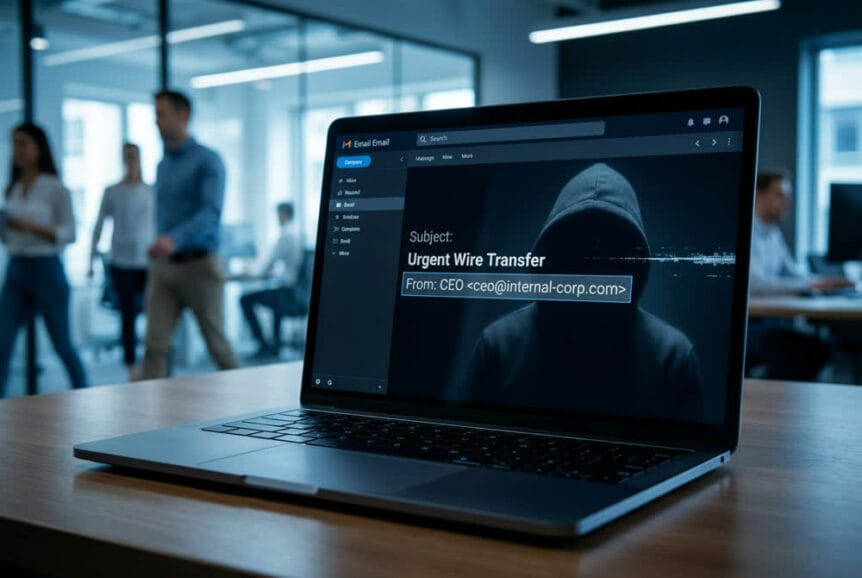
When your accounting manager receives an email from your CEO requesting an urgent wire transfer, they’re likely to act quickly. When HR sends a message about updating direct deposit information, employees typically click without hesitation. This trust in internal communications is exactly what cybercriminals are exploiting through increasingly sophisticated email spoofing attacks.
Unlike traditional phishing emails that come from obvious external sources, these attacks make malicious messages appear as if they originated from inside your own organization. The difference is profound: while employees might scrutinize an email from an unknown sender, they naturally trust messages that seem to come from colleagues, managers, or company systems.
What Makes Internal Spoofing So Effective
Attackers don’t just randomly guess at your company structure. They conduct detailed research using publicly available information from your website, LinkedIn profiles, and social media accounts. They learn who reports to whom, how your executives communicate, and what your typical business processes look like. This reconnaissance allows them to craft emails that mirror your organization’s actual communication patterns.
The psychological impact cannot be overstated. When an email appears to come from your CFO or HR director, it carries inherent authority. Employees are conditioned to respond promptly to internal requests, especially those marked as urgent or coming from leadership. This conditioning bypasses the skepticism that would normally trigger when receiving messages from external sources.
Common Attack Scenarios Targeting Your Business
The tactics used in these campaigns follow predictable patterns because they work. Fake HR announcements are particularly effective: employees receive what appears to be an internal message about updating payroll information, changing benefits, or acknowledging new policies. These messages often include links to credential harvesting pages designed to steal login information.
Financial fraud represents another common approach. Attackers create elaborate email threads that appear to show ongoing conversations between executives about vendor payments or contract approvals. These fabricated exchanges include fake invoices, fraudulent W-9 forms, and convincing bank verification letters. The goal is to trick your accounting team into sending money to accounts controlled by criminals.
Password expiration warnings and document sharing notifications round out the typical scenarios. These messages leverage routine business activities to create a sense of normalcy, making employees less likely to question their authenticity.
The Scale of the Problem in 2025-2026
This isn’t a theoretical threat. Microsoft’s security systems blocked over 13 million malicious emails connected to just one phishing platform, Tycoon2FA, during October 2025 alone. Phishing campaigns have continued to evolve through 2025 and early 2026, with emerging threats like QR code phishing, callback scams, and domain spoofing primarily targeting organizational mailboxes across various sectors.
When these attacks succeed, the financial impact is immediate and significant. Individual incidents have resulted in losses averaging $150,000 to over $1 million, with funds typically moved quickly through fraudulent banking accounts before the fraud is discovered—and recovery rates remaining discouragingly low, as 14% of BEC victims recover none of their losses.
Beyond direct financial theft, successful credential harvesting can lead to broader network compromises, data breaches, and extended recovery efforts.
How Attackers Bypass Your Email Security Systems
Understanding why these attacks succeed requires looking at how email systems actually work. Most businesses don’t have simple, direct email configurations. Instead, they maintain complex routing arrangements involving multiple services and servers, and these complexities create opportunities for exploitation.
Exploiting Complex Email Routing Configurations
Your email doesn’t necessarily travel in a straight line from sender to recipient. Many organizations route messages through third-party spam filters, on-premises Exchange servers, or archiving systems before they reach Microsoft 365. Each additional step in this chain represents a potential weak point.
The technical details involve something called MX records, which are essentially directions telling other email systems where to send your mail. When these records point to intermediate services rather than directly to Office 365, it creates scenarios where the normal security checks don’t function properly. Attackers exploit this by injecting spoofed messages at these intermediate points.
Businesses with MX records pointing directly to Office 365 are protected by Microsoft’s built-in spoofing detection. However, organizations using hybrid setups or third-party email security appliances may inadvertently create the exact conditions these attacks exploit.
Authentication Failures That Enable Spoofing
Email authentication relies on three main protocols: SPF, DKIM, and DMARC. Think of these as verification systems that prove an email actually comes from who it claims to represent. SPF checks if the sending server is authorized to send mail for your domain. DKIM adds a digital signature to verify the message hasn’t been altered. DMARC tells receiving servers what to do when these checks fail.
The problem occurs when these systems are configured with “soft fail” policies rather than strict enforcement. A soft fail essentially says “this email looks suspicious, but deliver it anyway.” Attackers specifically target organizations with these permissive settings because they know their spoofed messages will get through.
When examining the technical headers of these attack emails, security researchers consistently find the same pattern: SPF fails, DKIM shows no signature, and DMARC fails. Yet the emails still reach inboxes because the authentication policies don’t enforce rejection of messages that fail these checks.
The Direct Send Vulnerability
Microsoft 365 includes a feature called Direct Send, designed to let devices like printers and scanners send email without requiring user credentials. While useful for legitimate purposes, this feature becomes a security risk when improperly configured.
Attackers exploit Direct Send by connecting to your organization’s email endpoints without authentication. Because these connections originate from Microsoft’s infrastructure and don’t contain traditional malware or suspicious links, they often bypass security filters. The messages land in junk folders rather than being completely blocked, but that’s still enough for some to reach their targets.
Warning Signs Your Business Should Watch For
Recognizing these attacks before they cause damage requires awareness of specific indicators that distinguish spoofed messages from legitimate internal communications.
Technical Indicators in Email Headers
One of the clearest warning signs appears in the email headers themselves: when the “To” and “From” addresses are identical. Legitimate internal emails don’t work this way. If you receive a message supposedly from your own email address, it’s almost certainly spoofed.
Email headers also contain authentication results that reveal spoofing attempts. While most users never look at these technical details, your IT team can configure systems to flag messages showing authentication failures combined with claims of internal origin. The contradiction between an email claiming to be internal while showing external IP addresses and failed security checks is a dead giveaway.
Content and Behavioral Red Flags
Urgency is the attacker’s most reliable tool. Legitimate business processes rarely require immediate action that bypasses normal approval workflows. When an email from an executive demands urgent wire transfers without following established procedures, that deviation itself should trigger suspicion.
Pay attention to communication patterns. If your CFO suddenly starts sending late-night emails requesting financial information in ways they’ve never done before, verify the request through a separate channel. A quick phone call to verify a suspicious request can help prevent costly phishing breaches, which average $4.88 million per incident.
Financial and HR-Related Scam Patterns
Fake invoices in these campaigns often include supporting documentation that looks professional: W-9 forms, bank verification letters, and detailed payment instructions. The documents appear legitimate because attackers invest time in creating convincing forgeries. However, any unexpected request to change payment information or add new vendors should trigger verification procedures.
HR-related scams frequently involve requests for employee data, W-2 forms, or direct deposit changes. Establish clear policies that such requests must be verified through in-person or phone confirmation, never solely through email.
Protecting Your Business from Email Spoofing Attacks
Effective protection requires multiple layers of security, combining technical controls with human awareness and clear procedures.
Strengthening Email Authentication Settings
Start by properly configuring SPF, DKIM, and DMARC for your domain. SPF requires creating a DNS record that lists every server and service authorized to send email on your behalf. This includes your email provider, marketing platforms, and any third-party services that send messages using your domain.
DKIM implementation involves enabling email signing on your mail servers and publishing the corresponding public keys in your DNS records. This creates a verifiable signature that proves messages haven’t been tampered with in transit.
DMARC brings these protections together by specifying what should happen to messages that fail authentication checks. Begin with a monitoring policy to understand your current email flow, then gradually move to enforcement mode where failing messages are quarantined or rejected entirely.
Implementing Advanced Security Controls
Create mail flow rules that identify and block suspicious patterns. For example, configure rules to flag or reject messages where the sender domain matches your internal domain but originates from outside your organization. Add exceptions for legitimate external services that need to send mail appearing to come from your domain, such as certain cloud applications.
If your organization uses complex email routing with third-party services or on-premises servers, enable Enhanced Filtering for Connectors in Microsoft 365. This feature improves detection accuracy by helping Microsoft’s systems understand your actual email flow and apply appropriate security checks.
Configure URL rewriting and time-of-click verification for links in emails. This protection analyzes links when users click them rather than only when messages arrive, catching threats that emerge after initial delivery.
Employee Training and Verification Procedures
Technology alone cannot stop these attacks. Your employees need to understand the threat and know how to respond. Regular training should cover the specific scenarios attackers use: fake HR announcements, executive payment requests, and credential harvesting attempts.
Establish clear verification procedures for sensitive requests. Any email requesting financial transactions, credential changes, or sensitive data should be confirmed through a separate communication channel. This means calling the supposed sender at a known phone number, not using contact information from the suspicious email itself.
Create policies requiring dual approval for financial transactions above certain thresholds. This simple control prevents individual employees from being single points of failure, even if they’re fooled by a convincing spoofed message.
Moving Beyond Passwords: Building Long-Term Email Security
The fundamental problem with traditional email security is its reliance on passwords. When attackers can harvest credentials through convincing phishing pages, password-based authentication becomes the weakest link.
Phishing-Resistant Authentication Options
Modern authentication methods eliminate the password entirely, making credential theft irrelevant. Hardware security keys provide physical authentication that cannot be phished because there’s no password to steal. Even if an employee enters their username on a fake login page, without the physical security key, the attacker gains nothing.
Biometric authentication through Windows Hello for Business ties login credentials to specific devices using fingerprints or facial recognition. Microsoft Authenticator can be configured for passwordless authentication, using your phone as a secure token that approves login attempts.
These methods work because they’re bound to physical devices or biometric data that attackers cannot remotely compromise. A convincing fake login page becomes useless when there’s no password to enter.
Conditional Access and Identity Protection
Implement conditional access policies that require stronger authentication for sensitive applications and privileged accounts. Your accounting system might require hardware security keys, while less critical applications use standard multi-factor authentication.
Monitor for suspicious login attempts and unusual access patterns. Modern identity protection systems can detect when credentials are used from unexpected locations or in ways that don’t match normal behavior patterns, triggering additional verification or blocking access entirely.
Incident Response and Recovery Planning
Despite best efforts, compromises can occur. Having a clear incident response plan minimizes damage when they do. Immediate actions should include resetting compromised credentials, revoking active sessions, and reviewing account activity for unauthorized changes.
Check for suspicious inbox rules that forward emails or delete messages, a common technique attackers use to maintain access and hide their activities. Review any recent changes to financial information, payment details, or security settings.
Long-term improvements should address the root causes that allowed the compromise. This might mean tightening authentication requirements, improving email filtering rules, or providing additional staff training focused on the specific tactics used in the attack.
We help South Florida businesses implement these protections and respond effectively when security incidents occur. The key is understanding that email security isn’t a single solution but a combination of proper configuration, modern authentication, and informed users working together to prevent attacks before they succeed.